
Aerofly FS Global
Aerofly FS ( IPACS )Simulation
4.2201.00 Reviews
- Version
- 01.06.07.01
- Installs
- 100.00K
- Age Rating
- Everyone
Screenshots
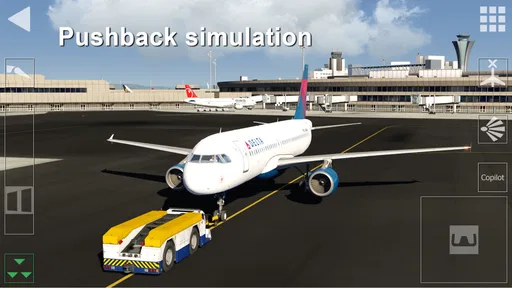


Our Review of Aerofly FS Global
 Analysis by Appyee
I tend to enjoy flight simulators most when they give me a choice about how much attention to pay: I might want to concentrate on a careful approach, or simply follow a route and take in the view. That balance is what I look for in Aerofly FS Global. It is a paid mobile simulation game from Aerofly FS (IPACS), and its appeal is less about quick wins than about making time for a flight and deciding how involved I want to be.
Choosing a flight that suits your time
A useful way to approach a flight simulator on a phone is to decide what kind of session you actually have time for. A short hop is easier to fit between everyday tasks, while a longer route gives you more time to settle into the cockpit and follow the instruments. I would start with a route that leaves room to practise takeoff and landing rather than picking the longest journey immediately. That makes the first session feel purposeful instead of turning into a test of patience.
The choice of aircraft matters for the same reason. The original article describes options ranging from smaller Cessnas to large airliners, with different handling between them. I’d treat that variety as a reason to change one thing at a time: learn a route in one aircraft, then try another and notice how the experience changes. Switching aircraft, weather, and route all at once makes it harder to tell what you’re learning.
Where the challenge comes from
For me, the reward in a flight sim is often the sequence rather than a single dramatic moment: setting up a route, keeping track of the flight, and bringing the aircraft in safely. The controls may be approachable, but “easy to begin” is not the same as “nothing to learn.” A new player can use the tutorials as a starting point, then repeat a manageable flight until the instruments and landing routine feel less unfamiliar.
There is also a practical trade-off in choosing how much realism to pursue. Tweaking fuel and weather can make a flight feel more personal, but every extra decision adds something to manage before takeoff. If I only have a few minutes, I would keep the setup simple and focus on flying. With a longer session, adjusting conditions and comparing how a familiar route feels can make the same basic activity more engaging.
Autopilot has a different kind of value: it can let you relax and watch the scenery, but it also means you are handing off part of the flying. I would use it when the aim is a calm sightseeing session, not when I want to practise staying attentive through the whole flight. That distinction helps set expectations—the game can support both a more hands-on outing and a more relaxed one, but those are not the same experience.
Making practice useful
A simple practice plan can make the learning curve less frustrating. I’d choose one aircraft, a familiar departure and arrival, and a clear goal such as becoming more comfortable with the controls or following the route using the instruments. Once that feels manageable, I’d change one variable, perhaps the weather or aircraft, and see what needs adjusting. This is more informative than repeatedly starting unrelated flights and hoping the controls become intuitive by themselves.
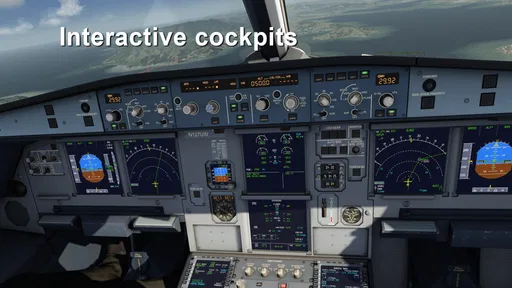
For a realistic everyday session, imagine having a quiet half-hour at home and wanting something more focused than a quick arcade game. I’d pick a short flight, use the cockpit view to keep the instruments in sight, and save the autopilot for a stretch where I want to enjoy the scenery. If the landing is rough, I’d repeat the same route rather than immediately moving to a more demanding one. That makes each attempt useful, even when it is not perfect.
Device readiness is part of that planning. The existing review notes that the detailed graphics and game data need enough device power and storage. I would check that before settling in for a longer flight, rather than discovering a storage or performance issue halfway through getting ready to play. The game is best enjoyed when the device can handle the experience comfortably; if it struggles, the visual appeal that helps sell the simulation can become a distraction.
What kind of simulator player will enjoy it?
This is a strong fit for someone who likes aviation, wants to explore routes at their own pace, or enjoys learning a control scheme through repetition. It can also suit a casual player who mainly wants cockpit views and scenic flights, since the autopilot offers a way to reduce the amount of active flying. The appeal is not limited to people who already know aviation terms, but newcomers should be willing to spend time with the tutorials and practise rather than expect every landing to feel effortless straight away.
I would be less likely to recommend it to someone looking for a fast, score-driven game with constant action, short rounds, or a clear stream of immediate rewards. A flight simulator asks for patience: the planning and journey are part of the point. It is also not the ideal choice if a player wants to avoid adjusting to controls or has very little time for a session. In those cases, a simpler arcade-style flying game may be a better match, even if it offers less of the cockpit-focused experience.
How it compares with other mobile flying games
Compared with the usual arcade flying alternatives, this game puts more emphasis on aircraft handling, route-following, and the feeling of being in the cockpit than on quick reactions or combat-style objectives. That gives it a more deliberate pace. Someone who enjoys choosing an airport, setting up a route, and watching a flight develop is likely to get more out of it than someone who mainly wants immediate action.
Within the simulation category, its combination of detailed visuals, different aircraft, and navigation gives players several ways to shape a session. The trade-off is that a more involved simulator asks more from both the player and the device than a lightweight casual game. I would choose this when I want to spend time flying, and choose a simpler alternative when I want entertainment that can be picked up and put down without much setup or learning.
Cost, access, and expectations
The game costs $3.99, with optional in-app purchases ranging from $0.99 to $19.99 per item. I’d think of the initial purchase as paying for the core simulator experience and consider any optional purchase separately, rather than assuming it is needed to enjoy a first flight. The game is rated Everyone, has a 4.4 average from around 3.7 thousand ratings, and has been installed over 100 thousand times. Those figures suggest it has found an audience, but they do not tell you whether its measured pace matches your own taste.
It was released on December 5, 2023, and the current version is 01.06.02.01. It requires Android 10 or later. Before paying, I would make sure my device meets that requirement and has room for the game’s data. Those are small checks, but they matter more here than they might for a tiny casual title because the graphics and world are central to the experience.
One question people often have is whether this is only for serious sim fans. I don’t think so: the tutorials and accessible controls offer an entry point, while the aircraft choices and navigation provide room to learn. But a newcomer still needs to enjoy practice. Another natural question is whether it works as a relaxing game. Yes, if you are content to let a flight unfold and use autopilot when you want a less hands-on stretch; if you want constant input and instant feedback, the pace may feel slow.
Taking Off with Aerofly FS Global
First things first, let's talk about the setup. Downloading Aerofly FS Global was a breeze. It's available for both Android and iOS, and the installation process is straightforward. Once you open the app, you're greeted with a sleek interface that just screams 'let's fly!'
Immersive Graphics and Realism
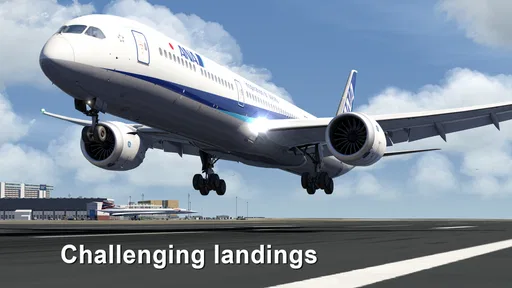
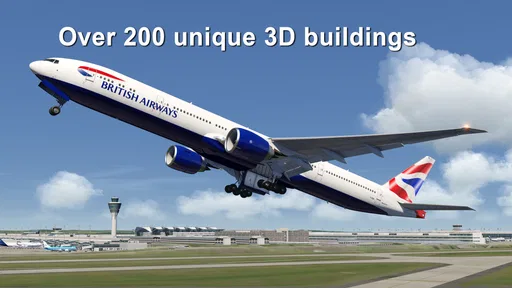
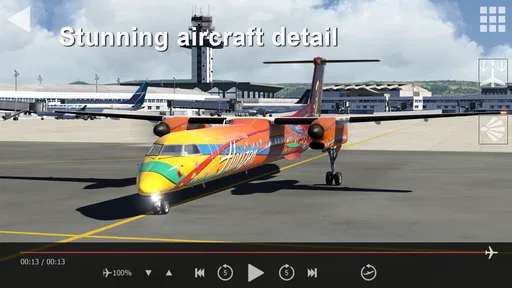
If you're big on visuals, you're in for a treat. The graphics in this game are seriously impressive. The developers have put a lot of effort into making the planes and landscapes look as realistic as possible. Whether you're flying over the Alps or cruising above the Pacific, the scenery is breathtaking. Every plane is modeled in detail, and the cockpit view makes you feel like you're actually in the pilot's seat.
What stands out is the attention to detail. The way the light reflects on the fuselage, the shadow of the plane on the ground, and even the changing weather conditions add a layer of realism that's hard to beat. It’s almost like having a mini flight simulator in your pocket!
Flight Mechanics and Controls
Now, onto the flying itself. The flight mechanics in Aerofly FS Global are top-notch. The controls are intuitive, making it easy for beginners to get the hang of flying without feeling overwhelmed. But don’t be fooled—there’s plenty of depth here for seasoned flight sim enthusiasts.
You have the option to choose from various aircraft, ranging from small Cessnas to massive airliners. Each aircraft handles differently, so you’ll need to adjust your flying style accordingly. The app even lets you tweak settings like fuel load and weather conditions to tailor your flying experience.
Exploring the Skies
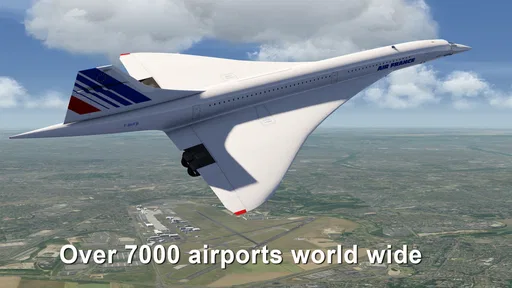
Aerofly FS Global offers a vast world to explore. The map covers a significant portion of the globe, and you can choose from thousands of airports to take off and land. Whether you're planning a short hop or a long-haul flight, the app has you covered.
The navigation features are pretty user-friendly. You can plot your course and follow the route using the in-game instruments. It’s a fun way to learn about real-world flight paths and navigation techniques. Plus, with the autopilot function, you can sit back and enjoy the view if you just want to relax and watch the world go by.
Learning Curve and User Experience
While Aerofly FS Global is accessible, there’s still a learning curve, especially if you’re new to flight simulators. Thankfully, the game includes tutorials that guide you through the basics of flying and landing. It’s a helpful feature that eases you into the more complex aspects of aviation.
The user experience is generally smooth, but just make sure your device has enough power and storage to handle the graphics and data. Once you’ve got that sorted, it’s smooth flying.
Final Approach
So, who is Aerofly FS Global for? If you’re someone who loves aviation or just wants to experience the thrill of flying, this app is definitely worth checking out. It’s a well-crafted simulator that offers a balance of realism and accessibility.
Overall, I’d say Aerofly FS Global is a fantastic way to explore the skies without leaving your home. It’s engaging, visually stunning, and provides a genuine flying experience that’s hard to match on mobile. So, buckle up, set your flaps, and get ready for takeoff!
Happy flying!
Verdict
Strengths of Aerofly FS Global
- Realistic flight physics enhance the experience.
- Wide range of aircraft to choose from.
- Detailed landscapes provide visual enjoyment.
- User-friendly interface for easy navigation.
- Regular updates improve gameplay and features.
Limitations of Aerofly FS Global
- Large storage requirement may deter some users.
- Steep learning curve for beginners.
- In-app purchases can be pricey.
- Limited multiplayer options available.
- Graphics may lag on older devices.
Similar Picks in This Category
View All
Truckers of Europe 3
Wanda Software4.3

Town Building Life Simulator
XGame Global4.2

Fidget Toys Trading・Pop It 3D
Freeplay Inc4.7

Sculpt People
CrazyLabs LTD4.4

Scary Teacher 3D
Z & K Games4.2

Hair Tattoo: Barber Shop Game
CASUAL AZUR GAMES4.3
Frequently Asked Questions
What devices are compatible with Aerofly FS Global?
Aerofly FS Global is designed to run on both Android and iOS platforms. For optimal performance, it is recommended to have a device with at least 3GB of RAM and a recent processor. Check the app store for specific device compatibility to ensure a smooth flying experience.
Does Aerofly FS Global require an internet connection to play?
Aerofly FS Global primarily offers an offline experience, allowing you to enjoy flying without an internet connection. However, an internet connection might be necessary for downloading additional content or updates. Always check for updates to enhance your gameplay experience.
What aircraft are included in Aerofly FS Global?
Aerofly FS Global features a diverse fleet of aircraft, including commercial airliners, fighter jets, and general aviation planes. Each aircraft is crafted with realistic details and controls. New aircraft may become available through updates, so keep an eye on the app store for the latest additions.
Are there in-app purchases in Aerofly FS Global?
Yes, Aerofly FS Global offers in-app purchases that allow users to unlock additional features, aircraft, and maps. While the base game provides a comprehensive experience, these purchases can enhance gameplay. It's advisable to review the in-app purchase options and costs before downloading the game.
How realistic is the flight simulation in Aerofly FS Global?
Aerofly FS Global is renowned for its realistic flight simulation, featuring accurate physics, detailed cockpits, and dynamic weather conditions. The game caters to both casual players and aviation enthusiasts, offering adjustable settings to tailor the experience to your skill level. The visuals and mechanics aim to replicate real-world flying as closely as possible.
Play our best games!


